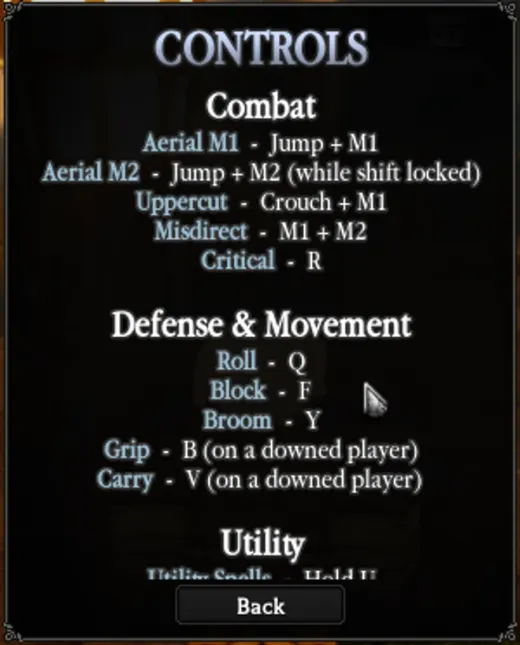
What are the combat keys?
| Action | Key |
|---|---|
| Aerial M1 | Jump + M1 |
| Aerial M2 | Jump + M2 (while shift locked) |
| Uppercut | Crouch + M1 |
| Misdirect | M1 + M2 |
| Critical | R |
| Block | F |
| Roll | Q |
Movement and misc keys
| Action | Key |
|---|---|
| Broom | Y |
| Crouch | Left Ctrl |
| Grip (on a downed player) | B |
| Carry (on a downed player) | V |
| Sprint | Double-tap W (setting: Double Tap Sprint, on by default) |
Menu and world keys
| Key | What it does |
|---|---|
| Tab | Character menu: Stats, Skills, Equipment, Professions, Bestiary |
| J | Quest Index |
| M | Map (nearby quests are marked) |
| E | Interact and chat with NPCs |
| P | Hide the HUD (cinematic view) |
| Hold U | Utility spells (including Mission Bird) |
| 0 to 7 | Hotbar tool slots 0 to 7 |
| Escape, L, Leave | Leave the game |
What can you change in Settings?
Settings has four tabs: General, Controls, Audio and Titles. General holds these toggles (defaults as we saw them):
| Setting | Default | What the game says |
|---|---|---|
| Alerts | On | Toggle game notifications. |
| Environment Destruction | On | Toggle map destruction VFX. |
| Performance Mode | Off | Toggle fast mode performance. |
| Show Invites | On | Toggle party and guild invites. |
| Quest Icons | On | Toggle quest icons. |
| Trading | On | Toggle trading invites. |
| Auto Run | Off | Always run while moving forward. Running M1 then needs your sprint key + M1. |
| Double Tap Sprint | On | Toggle double tap to sprint. |
| Hold M1 | On | Toggle hold M1 on light attacks. |
| Show Player List | On | Toggle player list. |
| Show HP & Mana % | Off | Always show your HP and mana % on their bars. |
| Use Air Dash | On | Toggle air dash if unlocked. |
Audio has a Music volume slider (100 by default). Titles showed "0/23 titles unlocked" on a new character, with names such as Adept Alchemist, Adventurer, Archivist, Baron and Early Access.
Controller bindings and the full Utility section are not verified yet.
Frequently asked questions
How do you roll and block in Clover RPG?
Roll is Q and Block is F.
How do you use your broom?
Press Y.
How do you open utility spells?
Hold U.
Can you rebind keys?
The Settings Controls tab lists Combat, Misc and Hotbar binds with a RESET TO DEFAULT button, so yes. We did not change any.
Does Clover RPG support controller?
Yes. The Roblox game page lists PC and controller. Controller binds are not verified yet.
Related pages
Sources
- Help (?) → Controls and Settings → Controls / General, read in-game Nov 5, 2026.
- Menu keys used in-game Nov 3, 2026.